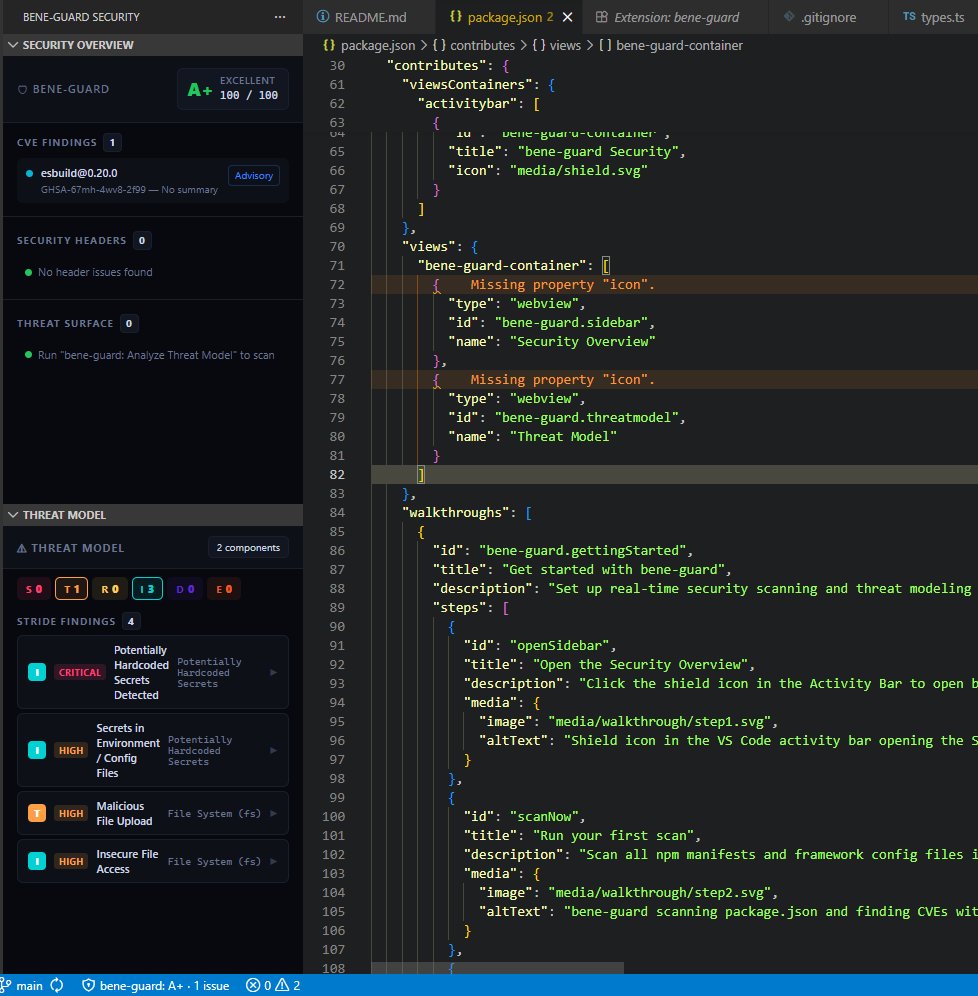
Watch bene-guard detect vulnerabilities, secrets, and misconfigurations as they appear — in real time inside your editor.
package.json — demo-project
package.json
app.js
next.config.js
CRITICALCVE-2021-23337
lodash 4.17.11 — command injection via template
Quick fix → bump to 4.17.21
Security Overview
A+
Security grade
CVEs 0
lodash — CVE-2021-23337
axios — CVE-2020-28168
minimist — CVE-2021-44906
Secrets 0
AWS Key detected
GitHub token detected
Headers 0
Missing CSP header
Wildcard CORS
Features
Everything you need to ship secure code
Multi-ecosystem CVE scanning
Scans npm, PyPI, Go, and RubyGems manifests on every save via the OSV API — the same database powering GitHub Dependabot. Inline diagnostics with severity colours and advisory links.
Secret detection
Scans every source file for 15+ hardcoded credential patterns — AWS keys, GitHub tokens, Stripe, OpenAI, private keys, and more. Preview-safe: only the first 6 chars are shown, never the full value.
Header linting
Parses Next.js, Vercel, Netlify, and Helmet configs. Checks 7 OWASP headers against production best practices. Flags missing headers and misconfigs like unsafe-inline CSP and wildcard CORS.
STRIDE threat model
Analyzes auth surfaces, databases, API routes, external services, secrets, and file I/O. Maps each component to STRIDE categories with severity and mitigation suggestions. Exports to THREAT-MODEL.md and SARIF.
One-click fixes
Every finding comes with lightbulb code actions. Insert secure defaults, strip unsafe CSP directives, bump a vulnerable package, or jump to the OWASP cheat sheet — without leaving the editor.
Monorepo support
Discovers all manifests workspace-wide at activation — up to 50 files by default. The sidebar shows a "X files scanned" indicator so you always know the full coverage across all packages.
Try it yourself
Open the demo project
Clone the showcase repo, open demo-project/ in VS Code with bene-guard installed, and see all of these findings appear in real time.
bene-guard combines CVE severity scores, secret detection, header configuration weights, and STRIDE threat surface analysis into a single letter grade — visible in your status bar and sidebar at all times.
CVE findings
Hardcoded secrets
Header misconfigs
STRIDE threats
Get started in seconds
Install from Open VSX or download the .vsix directly. Works with VS Code, VSCodium, Cursor, Windsurf, and Gitpod.